
Four-face architectural display · fixed-column integration
Square Column LED Screen
A Square Column LED Screen wraps four flat display faces around a square or rectangular pillar, turning an existing structural column into a four-direction media surface. Its main design challenge is the transition at each 90-degree corner: the cabinet geometry, viewing angles, seams and content map must agree. Start with a measured column survey and sightlines, then decide whether the display is flush, framed or spaced from the host structure.
Review a Column Drawing →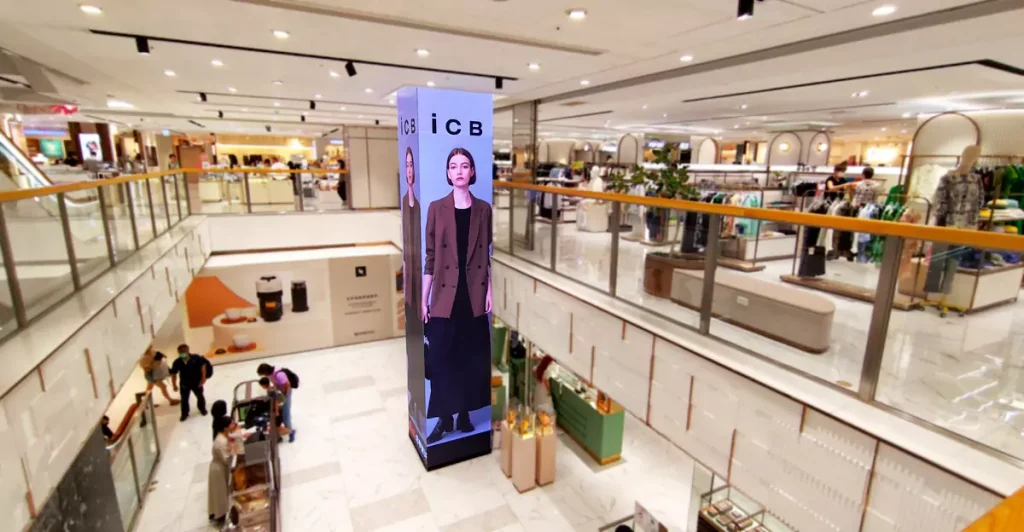
Definition
Resolve the four faces and corners before choosing modules
Measure the finished column on all four sides and at more than one height; existing pillars are not always perfectly square, plumb or consistent from floor to ceiling. Record corner radius or chamfer, wall obstructions, access panels and nearby fixtures. Then define the active display faces and whether a video should continue across corners or be composed as four independent panels.
For a cylindrical or continuously curved wrap, compare Column LED Screen. A freestanding all-around media object is closer to LED Pillar.
Engineering
Engineering the Geometry of Square Column LED Screen
Column width
Record each side length and the column's variation along its height. These measurements determine face widths, module layout and whether a leveling or stand-off frame is needed.
Column depth
Confirm the fourth-side plan and any corner return. A plan view should identify all four faces, corner geometry, clearances and where the display begins and ends.
Active height
Set the active screen height separately from the floor-to-ceiling column height. Check ceiling, lighting, sprinklers, access doors and any non-display band at the base or top.
Four corner details
Specify each corner as square, radiused, chamfered or intentionally separated. The selected treatment affects viewing continuity, module edges, protective trim and how content crosses the junction.
Face-to-face alignment
Check face widths and vertical datums after the frame is surveyed and installed. Small alignment differences can make a grid or moving line appear to step at the corners.
Base/ceiling clearance
Coordinate top and bottom clearances, wall access, cable entry and the path for removing a module. Confirm whether front service or rear access is possible before the pillar is enclosed.
Specification
Dimensions and interfaces to confirm before fabrication
| Shape-specific engineering parameter | Value | Engineering use |
|---|---|---|
| Measured side lengths and column profile | Project-defined / confirm by drawing | Survey all four sides at several heights; note taper, out-of-square conditions, plumb, cladding and existing obstructions. |
| Corner radius, chamfer and return | Project-defined / confirm by drawing | Provide plan details for all four corners and agree how the active image, trim and protective edges meet. |
| Active display height and end clearances | Project-defined / confirm by drawing | Separate the LED height from total column height; show ceiling, floor, fixtures, access panels and non-display bands. |
| Frame, stand-off and attachment points | Project-defined / confirm by drawing | Show the support interface, leveling method, cable path and any approved attachment zones on the host column. |
| Face alignment and seam datum | Project-defined / confirm by drawing | Set a common vertical datum and face-to-face alignment tolerance for installation and pixel-map references. |
| Service method and access envelope | Project-defined / confirm by drawing | Confirm front or rear module access, removal direction, nearby circulation and room to perform routine service. |
This is a project survey and quotation checklist, not a published Highcolor specification. Confirm pixel pitch, brightness, refresh, protection level, module construction, support details and control configuration for the selected project.
Four-face content mapping
Map the content across each face and each corner
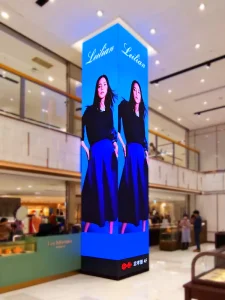
A four-sided column can display one image that wraps around all faces, four synchronized panels, or separate content on selected sides. These are different content and control decisions. Mark each face with a consistent viewing direction and map its pixel order, seams and any inactive corner gap before artwork begins.
Test the map with a fine grid, a horizontal line and an object that crosses each corner. If content should appear continuous, correct for physical seams and viewing angle in the canvas design; if each face is an independent placement, keep important text and logos away from the edge. Store the final map with the installation drawings.
Installation decision
Fit the display around the host column and keep it serviceable
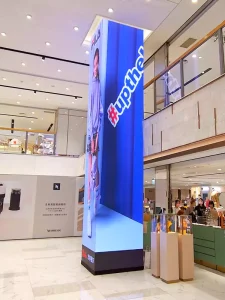
For an existing pillar, survey the real surface instead of assuming a nominal square dimension. Design the support and leveling approach around the verified structure, nearby building services and any finish that must remain untouched. Decide how modules, power and receiving components will be reached later, and how the display can be installed without obstructing circulation or access panels.
For a round column requiring a continuous curved surface, see Column LED Screen.
Cost drivers
What affects the cost of a Square Column LED Screen?
Pricing depends on the active area and selected pixel pitch, the measured perimeter, corner treatment and support method. An existing column that varies along its height may require a custom frame or leveling work. Include the survey, access method, control layout and installation conditions in the quotation request so the scope reflects the real site.
Column perimeter and active area
The four side lengths and display height establish the amount of LED surface and the module layout.
Corner construction and finish
Square, chamfered or radiused corners affect edge details, image transitions and protective trim.
Survey variation and support frame
Out-of-square or tapered host columns may need extra measurement, leveling and a project-specific support interface.
Service access and installation
Access constraints, working height, circulation and module-removal direction influence installation planning.
Drawing review
Check the survey and content map together
Before fabrication, compare the column survey, frame drawing and pixel map as one coordinated set. A correct cabinet layout can still look wrong if one face is reversed, a corner is treated differently in the artwork, or the real pillar changes dimension above the survey point. Review dimensions from the site, not only from architectural plans.
Four face measurements
Confirm each side length at the base, middle and top of the active area. Record plumb, taper and surface changes so the frame does not force uneven gaps or misaligned faces.
Corner profile and image transition
Approve the physical corner detail and the intended content behavior at all four junctions. Check a grid and high-contrast line on the actual layout to reveal breaks or offsets.
Mounting frame and host structure
Identify attachment zones, stand-off distance, leveling adjustment and cable route. Have the project team confirm that the host column and proposed interface are suitable for the installation.
Active height, ceiling and fixtures
Check the display envelope against lights, sprinklers, signage, access panels and ceiling conditions. Keep a clear distinction between the structural column and the active screen area.
Pixel map and viewing direction
Label front, left, rear and right faces from a fixed reference point. Verify the controller map and content orientation with a grid before loading campaign artwork.
Service route and replacement method
Show how a module is reached and removed, where power/control parts sit, and whether technicians can work without blocking a primary circulation route.
FAQ
Square Column LED Screen: common questions
What measurements are needed to quote a Square Column LED Screen?
Provide all four side lengths at the bottom, middle and top of the active area, plus corner details, active height, photos or drawings of the host column, viewing directions and access constraints. Also identify fixtures, access panels and any finish that cannot be drilled or covered.
Can one video continue around all four faces?
Yes, when the face order, pixel orientation and corner seams are mapped as one coordinated canvas. Some projects instead use synchronized or independent content per face. Decide the intended behavior before artwork production and test it with a grid or moving line on the installed layout.
How should a screen fit an existing column that is not perfectly square?
Survey each face at multiple heights and record taper, plumb and corner variation. The frame design can then account for the measured condition with an agreed leveling or stand-off method. Architectural plans alone may not show the finished cladding or site tolerances.
What corner treatment should I choose?
Square, chamfered, radiused or separated corners each create a different physical edge and image transition. Choose based on the intended viewing distance, content continuity, module construction and protective trim, then show the detail consistently in the plan and elevations.
How are modules serviced on a column display?
Service access depends on the host column and support design. Confirm front or rear access, module removal direction, cable routes and clearance for technicians before installation. Keep access panels and building services reachable after the display is fitted.
How does a square column display differ from a cylindrical column screen?
A square column has four planar faces and defined corner transitions. A cylindrical column screen uses a continuous curved surface or many segments approximating a curve. The shape affects module arrangement, content mapping and how the display meets the host structure.
Related column and architectural formats
Choose a format by the column shape
An led surface wrapped around an existing column, commonly using a cylindrical or multi-segment curve tied to the host column geometry.
A vertical led pillar designed as a self-contained architectural object with emphasis on footprint, height and all-around presentation.
An led installation that turns across an inside or outside architectural corner while preserving image continuity.
Start with a measured column survey
Send a plan view, elevations or site photos with all four side lengths, corner details, active screen height, viewing directions and access constraints. Highcolor can review the proposed face layout, support interface and content-map inputs for a project quotation.
Request Engineering Review →