IMMERSIVE DISPLAY · CUSTOM GEOMETRY
Hemisphere LED Screen
Plan the half-sphere surface around the viewing side, rim diameter, depth, support structure and curved pixel map. First decide whether the audience sees the inner dome or the outside shell.
Discuss a custom display →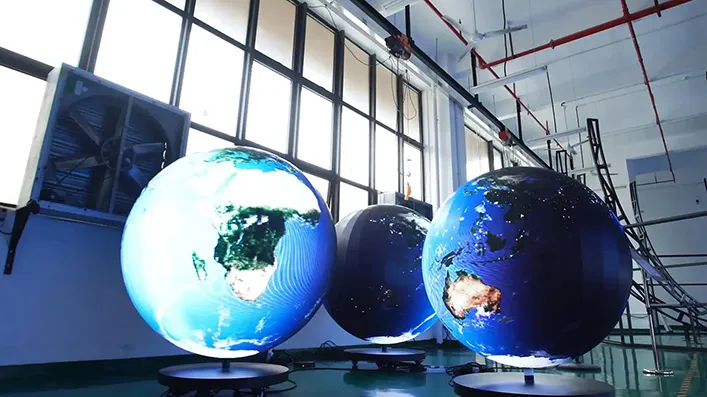
PROJECT DEFINITION
A curved display surface with one open rim.
A hemisphere LED screen forms a half-sphere or a partial spherical cap. The term can describe an immersive concave surface viewed from inside, or a convex display viewed from outside. These are different projects: viewing direction changes the panel layout, structural interface, content map and maintenance plan.

Set the viewing direction before choosing the structure.
Concave · viewed from inside
The curved LED surface wraps around an audience or operator. Plan seating position, head and neck comfort, sightlines, immersive content format, sound, exits and service access behind or between sections.
Convex · viewed from outside
The outside of the hemisphere becomes a sculptural visual feature. Define the main approach paths, viewing angles, rim support, cable concealment and whether the display must be readable from every side.
Partial cap or tilted form
A project may use less than a full half-sphere or place the rim at an angle. Record the cut plane, opening direction, angle coverage and display boundary on drawings; the word “hemisphere” alone is not enough.
Use a drawing with explicit dimensions, not a concept label.
For a true hemisphere, the radius is half the rim diameter and the pole-to-rim depth equals the radius. Partial caps need their own coverage angle and cut-plane dimensions. These geometric relationships help scope the enclosure; they are not product specifications.
Rim diameter (D)
Measure the opening across its finished edge. State whether the number is the active display diameter, the structural outside diameter or the clear interior opening.
Radius (R) and depth
For a full hemisphere, R = D ÷ 2 and depth from pole to rim = R. For a truncated cap, confirm the cap height and cut-circle diameter separately.
Coverage and orientation
Mark the azimuth and elevation coverage, opening direction, tilt and any missing panels. For an interior dome, define where the audience sits relative to the pole.
Support interface
Dimension the rim or support ring, attachment locations, load path, center of gravity, floor or ceiling connection and tolerances for the building interface.
Geometry example · full hemisphere
For a full hemisphere with a 4 m rim diameter: radius = 2 m, and pole-to-rim depth = 2 m. Actual panelized dimensions, structural clearance and active pixel area must be confirmed from the selected design.
Map pixels onto the hemisphere before content production.
A flat rectangular file cannot simply be stretched over a hemispherical surface without distortion. The display map must account for panel positions, curve geometry, the chosen viewing side and the content system that will drive it.
Panelized surface
Confirm module or cabinet size, segment count, orientation, seams, gaps and the pixel resolution of each segment. A regular-looking shell can still have non-uniform pixel spacing across a curve.
Coordinate mapping
Create an agreed pixel map tied to the assembly drawing. Identify the pole, rim, section boundaries, orientation marks and any non-active edges that content must avoid.
Content projection
For an interior dome, confirm whether content is authored as a fulldome/fisheye master and how the media server or processor maps it to the physical LED sections. Exterior content needs a defined viewing center or multi-view plan.
Calibration and review
Check alignment, color, brightness and seam continuity from the intended audience positions. Review representative content on the actual mapped canvas before final production.
Hemisphere, full dome or sphere?
Hemispherical display
One open rim and a defined cut plane. It can be concave for an enclosed immersive view or convex as a visible architectural feature; the audience side must be stated.
Full dome
A larger enclosure can surround more of the audience’s field of view. Access, exits, seating, sound, structure and a wider content surface become part of the room design.
Spherical display
A complete sphere has no single open rim and may be viewed around its exterior or designed as an inner enclosure. Rotation, support, cabling and the intended viewing envelope differ substantially.
Choose by the required audience experience and installation envelope; product names are not interchangeable. Immersive dome solutions typically coordinate the LED surface with geometry-aware media processing.
Design the support and service plan with the LED surface.
Frame and segmentation
Define how the curved surface is divided, how each segment attaches to the frame, how tolerances accumulate and how the rim finishes against the surrounding architecture.
Hanging or ground support
Confirm dead load, support points, restraint, local structural review, transport and installation sequence. Never size suspension from screen area alone.
Service access
Decide which components are replaceable, from which side, and whether technicians can reach the pole, upper sections, power supplies and receiving cards without dismantling major structure.
Thermal and cable routes
Allow for airflow and safe access around electronics. Route power and data with bend radius, connector position, strain relief, signal redundancy and service loops in mind.
For public installations, the structural engineer, venue and electrical contractor should approve the final assembly and access plan for the site.
Check the route from delivery to final position.
Room and ceiling
Record clear height, floor loading, doorway and lift dimensions, access route and working clearance around the rim.
Audience and sightlines
Provide seating or visitor positions, expected dwell time, viewing angles, accessibility needs and the closest normal viewing distance.
Lighting and environment
Document ambient light, reflections, sunlight, dust, humidity, temperature, acoustic treatment and any adjacent projection or lighting systems.
Operations
Identify content operator, playback/control location, show schedule, access hours, cleaning approach, spare modules and support responsibilities.
Match the geometry to a real viewing experience.
Immersive theatre and planetarium
Use the inner surface when the goal is to wrap an audience in imagery. Seating layout, viewing pole, media format and service access must be planned together.
Museum and science center
A contained curved canvas can support education, visualization and group experiences; choose the opening and audience arrangement around circulation and accessibility.
Simulation and training
A partial dome may provide a broad visual environment for operators or trainees. Define the field of view, simulator position, latency and application content requirements.
Atrium or brand environment
An exterior convex hemisphere can become an architectural focal point. Evaluate sightlines from all approaches, structural support and content readability at different angles.
What changes the cost of a hemisphere LED screen?
The main cost drivers are the active display area and pixel design, but a custom curved installation also includes mechanical structure, processing, access and site work. Compare the same defined scope when reviewing proposals.
Curvature and pixel design
Diameter, cap depth, coverage, segment count, active area, pixel pitch and the complexity of the mapped resolution.
Structure and finish
Frame material, support ring, hanging or base design, enclosure, trim, safety provisions, transportable sections and architectural integration.
System and content
Processor or media server capacity, mapping/calibration, custom content, control position, signal paths, commissioning and spares.
Site and installation
Access equipment, rigging or lifting, room modifications, engineering review, installation hours, travel and maintenance provisions.
A practical sequence from concept to commissioning.
1 · Define the experience
Choose concave or convex viewing, full hemisphere or partial cap, audience positions and primary content.
2 · Survey and dimension
Record rim diameter, depth, coverage, opening angle, site clearances, support interface and access route.
3 · Coordinate system design
Approve segment layout, panel map, frame, power, data, processing, service access and installation sequence together.
4 · Test and commission
Validate geometry, pixel map, playback, calibration, audience sightlines and maintenance procedure before handover.
Common questions before specification.
What is a hemisphere LED screen?
A direct-view LED surface formed as a half-sphere or partial spherical cap. The project must specify whether it is viewed from the concave interior or the convex exterior.
How do you calculate hemisphere depth?
For a true hemisphere, depth from pole to rim equals the radius, which is half the rim diameter. Partial caps require their own height and cut-circle dimensions.
Can a flat video be displayed on a hemispherical surface?
It can be mapped, but the content may need geometry-aware warping or a fisheye/fulldome master. Confirm the physical panel map and media-server workflow first.
Does every hemisphere use the same panel layout?
No. Curvature, sectioning, module geometry, orientation, pixel pitch and whether the display is inner- or outer-facing affect the layout.
How is a hemispherical LED screen maintained?
The service approach depends on panel access, electronics placement, support frame and whether technicians can reach the inner or outer surface. Define replaceable parts and access routes during design.
What is needed for a reliable quote?
Provide a dimensioned drawing, viewing side, rim diameter, cap depth, coverage angle, support points, site photos, audience layout, content format and installation location.
Compare nearby display shapes and product types.
For projects where an immersive dome surface and a wider viewing enclosure are the primary requirement.
For continuous curved wall surfaces that follow a concave, convex or changing-radius line.
For a circular display form with a different viewing envelope and structural layout.
Start with the viewing side and a dimensioned drawing.
Share the rim diameter, depth, coverage angle, audience position, support conditions, content format and installation site. These details let the project team assess the display geometry and system scope.
Request a project review →