
Control Room LED Displays
A control-room display must keep critical information readable across long operating hours, multiple live sources and changing operating conditions.
Choose the display around the control-room workflow
The right wall depends on viewing distance, source count, operating hours and the consequences of downtime. Compare the display technology and signal workflow together before fixing the specification.
Direct-view LED
Tiled LCD
Projection or hybrid layouts
Control-room LED display questions
How do I choose pixel pitch for a control room?
What affects the total project cost?
Can the wall show multiple sources at once?
What should be specified for continuous operation?
Design the display around information priority
Inventory the sources and sort information into persistent, rotating and event-triggered content. Keep alarms and time-critical data visible without relying on a rotating playlist. Test labels and smallest text at real operator distances, then size the canvas and source windows so the wall remains readable during busy periods.
Plan viewing geometry and operator ergonomics
Map seated and standing eye positions, distance to the wall, viewing angles, ambient light and task lighting. Position displays to avoid reflections and neck strain, preserve direct access to consoles, and keep alarms inside the normal field of view. Confirm mounting structure, access panels and service paths before fixing the layout.
Engineer uptime, redundancy and recovery
Agree acceptable interruption and recovery times with operations. Document redundant source and signal paths where required, power architecture, monitoring, spare modules or panels, escalation contacts and maintenance windows. Rehearse how operators identify a failed source, switch to backup and restore normal layouts without losing priority information.
Coordinate display, room systems and service
Coordinate heat load, cooling airflow, acoustic impact, mounting access and cable routes with the control-room and facilities teams. Keep ventilation and service clearances open, plan safe access for technicians, and check that maintenance can happen without disrupting critical operations.
Explore control room applications
LED Stock Ticker Display
Explore pageControl Room LED Wall
Explore pageMap the control-room signal path before installation
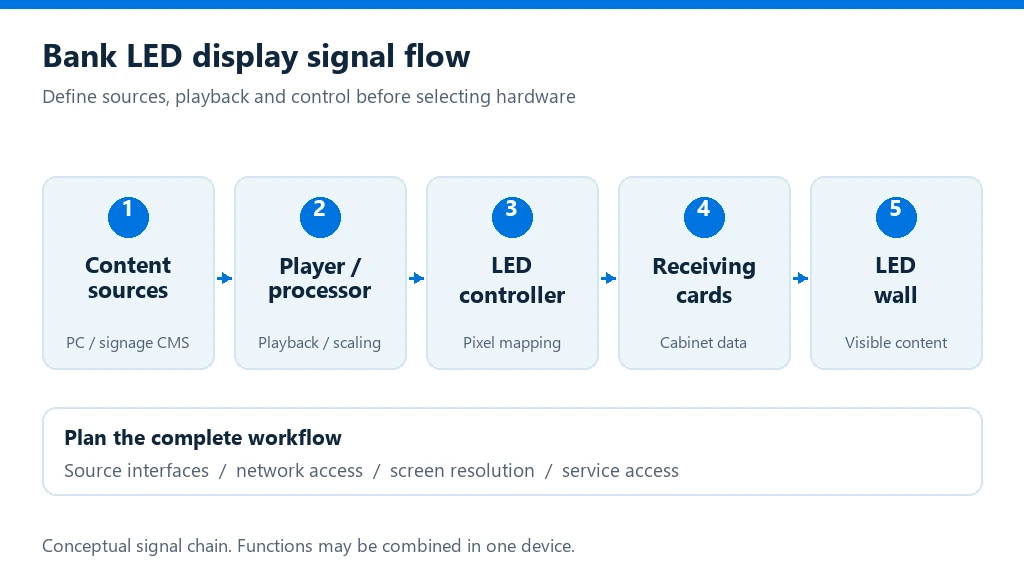
Connect sources, wall processing and operator action
Document which monitoring, SCADA, video and communications sources feed the wall, where processing and source selection happen, and how operators change layouts. Confirm input formats, scaling, labels, control permissions and alarms. A clear signal-flow drawing makes commissioning and fault isolation faster, and helps prevent a large wall from becoming a display surface without an actionable workflow.
Control-room project implementation checklist
Use a joint review with operators, IT/OT, facilities and the display integrator. Confirm responsibilities and acceptance criteria before procurement.
Define the operating scenario
Record the room’s operating hours, operator count, source inventory, alarm priorities, normal and incident layouts, acceptable downtime and recovery process. Separate time-critical data from content that can rotate.
Verify the display and room infrastructure
Confirm the finished canvas dimensions and resolution, pixel pitch against viewing distance, brightness control, processor capacity, mounting structure, power, cooling, cable routes, access clearances and service method. Treat redundancy and environmental ratings as project requirements to verify against exact equipment specifications.
Agree commissioning and handover
Test source switching, window layouts, alarm visibility, backup paths, brightness presets and recovery procedures with representative operators. Handover drawings, signal maps, saved configurations, maintenance instructions, spare parts and escalation contacts.
Plan a control-room display around operator needs
Share room drawings, operator positions, source inventory, operating schedule, information priorities, acceptable downtime, infrastructure constraints and support requirements. This helps define the display canvas, control workflow, redundancy and commissioning scope.
Discuss your project