
CONTROL ROOM
Control Room LED Wall
Design a control-room LED wall around operator tasks, source workflows, critical information, uptime targets and the physical control-room environment.
Coordinate the wall with room operations
Prioritize information for fast operator decisions
Sort content into always-visible alarms and key metrics, routine monitoring windows and incident-specific sources. Keep labels and status indicators readable without zooming, reserve space for changing layouts, and agree who can rearrange windows. Test data density from each operator desk during normal and high-activity periods.
Validate the wall from real operator positions
Measure seated and standing viewing distances, angles, ambient light and task lighting. Validate smallest text, pixel pitch, contrast and luminance from normal postures across a full shift. Check reflections and neck movement, and confirm that high-priority content remains inside operators’ normal field of view.
Engineer continuity and failure recovery
Set uptime and recovery targets with operations, then identify the single points of failure across sources, processors, data links and power. Document redundant paths where required, monitoring, spare modules, backup layouts and who can switch sources. Rehearse a feed loss and a display fault so operators know what remains visible and how to return to normal.
Plan service without disrupting control-room work
Choose mounting and cabinet access that let technicians replace modules and reach power or data connections without blocking operator positions. Keep ventilation paths clear, schedule maintenance windows with room operations, and place configuration, calibration and source maps under change control.
Design the control-room wall for real operating tasks
Use the display as a shared operational view with clear priorities and a predictable response to change. Confirm these design choices with the operators and system owners.
Canvas and layout
Determine wall dimensions, pixel resolution and source-window arrangement from the required dashboards, maps, video and alarms. Keep persistent information visible and leave room for incident-specific views.
Operator visibility
Test smallest text, contrast, viewing angle and luminance at each console. Confirm status colors are accessible and important alarms remain distinguishable without depending on color alone.
Sources and control
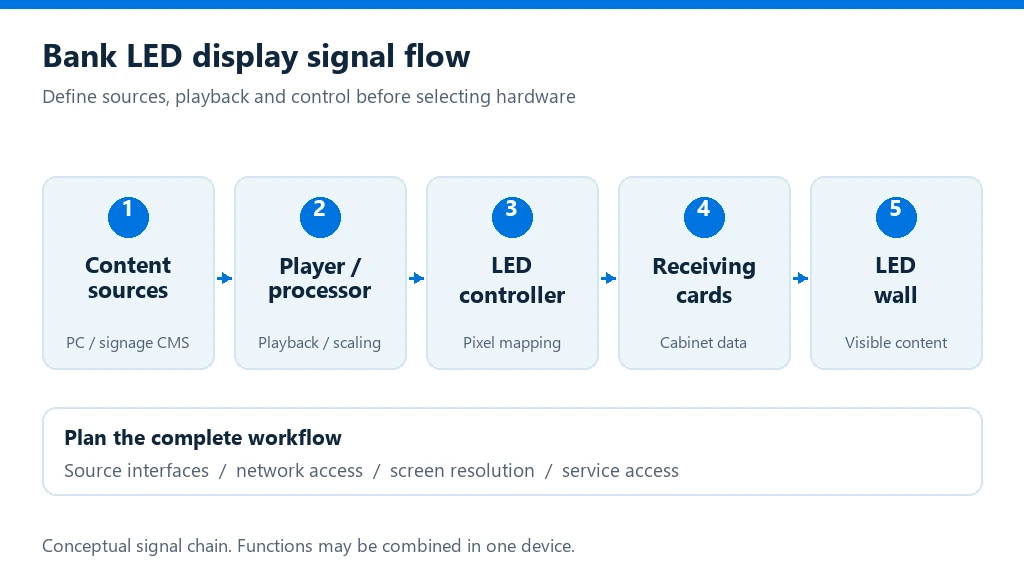
Document input types, source selection, processor or controller roles, layout permissions and alarm behavior. Agree who can switch layouts and how changes are logged or restored.
Infrastructure and service
Confirm mounting, power, cooling, network and signal routes, physical access, spares and maintenance windows. Verify assumptions against the selected equipment and room design.
Control-room LED wall: frequently asked questions
How should pixel pitch be selected for a control room?
Start with viewing distance, the smallest information that must be legible, source content and layout. Validate dashboards and maps from actual operator positions instead of relying on a generic room-size rule.
Can operators show multiple sources at once?
The processor and control workflow must support the required inputs, formats, windows and operator controls. Confirm scaling, switching, priorities and behavior when one source becomes unavailable.
How can the wall remain useful during a display or source fault?
Define backup sources, priority layouts, monitoring and recovery responsibilities according to the room’s uptime target. Rehearse failures and confirm operators can identify whether a problem is in the source, signal path or display.
What should be included in project handover?
Include as-built drawings, source and signal maps, saved layouts, configuration files, operating instructions, spare-parts details, maintenance guidance and escalation contacts. Train operators and technicians on their actual roles.
Scope a control-room LED wall around your operation
Share room drawings, operator positions, source inventory, information priorities, viewing distances, uptime and recovery targets, infrastructure constraints and maintenance windows. Include the operating team and commissioning expectations so the proposed wall supports a real control-room workflow.
Discuss your project