
AIRPORT INFORMATION SYSTEMS
Flight Information Display
Deliver clear departure, arrival and gate updates by connecting airport-approved data, flight layouts and LED displays into one well-defined information service.
Explore Transportation Solutions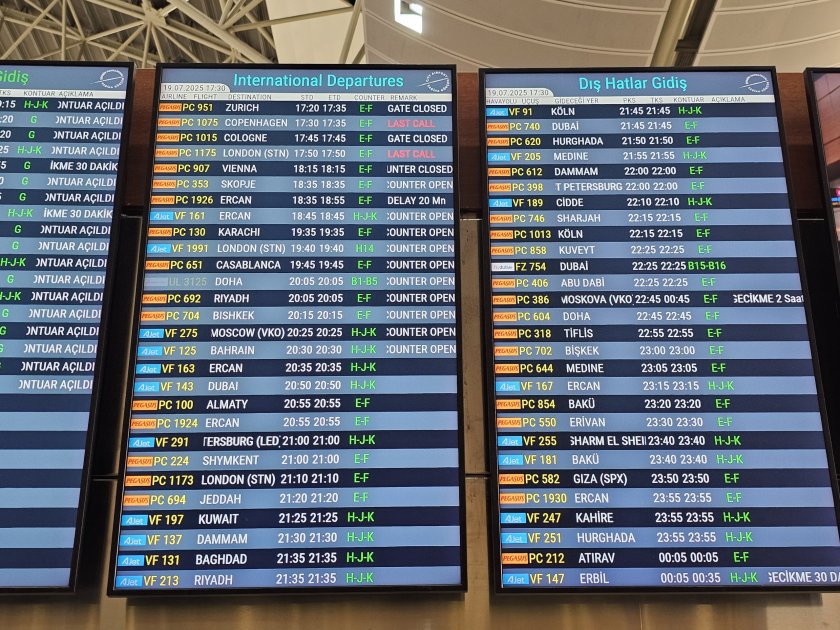
Make flight information easy to scan
A flight information display should surface the next useful decision—check-in, security, gate or boarding—while keeping each status tied to its airport-approved data source. Layouts should reflect real viewing distance, passenger movement and the time available to read.
A flight information display is one link in the FIDS service
Protect readability, freshness and status meaning
Plan a replacement without losing service
Design the information hierarchy for real passenger behavior
Use the passenger's first question to shape each board: confirm the flight, find its destination, see the latest status or locate a gate. Test sample layouts with peak and quieter schedules, long destination names, late changes and the actual viewing distance.
Test crowded boards and quieter timetable states at realistic scale.
Agree language, date and time formats with airport stakeholders.
Give urgent operational updates a distinct, approved visual treatment.
Specify the FIDS data path and publishing rules
FIDS integrations should preserve the meaning of the source data from the airport system to the visible board. Document field mapping, refresh and latency expectations, correction authority, network responsibility, monitoring and fallback behavior. Keep manual overrides limited to authorized roles and auditable where required.
01
Document source fields, transformations, refresh timing and error handling.
02
Define when information is considered stale and which approved fallback appears.
03
Assign permissions and record the process for manual corrections.
Use different layouts for different airport zones
Main concourse boards, check-in areas, security approaches, baggage halls and gate displays answer different questions. Reuse visual rules where helpful, but set the information density and screen format for the location instead of stretching one timetable layout across every zone.
Primary check
Map board locations to the passenger question and the next action.
System checks
Review glare, approach direction, queue positions and sightlines.
What to specify in an airport flight information display
The display configuration should be verified against real timetable content and terminal conditions. These four workstreams help airport teams, FIDS providers and display integrators agree a complete scope.
Viewing & pixel layout
Use the nearest and farthest viewing distances, board dimensions and sample rows to decide how much information fits while remaining legible. Confirm native resolution, pitch and line count from the actual design.
Status hierarchy & content
Define the role of departure, arrival, gate, check-in, baggage and disruption messages. Agree status terms, language rules, time conventions, content approval and visual priority with airport operations.
Data, software & network
Document the source system, interface owner, field mapping, refresh expectations, network boundaries, user permissions, monitoring and support responsibilities across the FIDS, signage software and LED processor.
Brightness, mounting & service
Assess ambient light and glare by location, structure and cable routes, power, cleaning and maintenance access. Include operational windows, spare parts, commissioning and service response in the deployment plan.
Validate the complete service before opening
Run end-to-end tests with representative flight data and disruption scenarios. Confirm the source update reaches the expected screens, permitted teams can make corrections, failures are recognizable and the recovery process does not leave passengers with misleading information.
Test feed updates, gate changes, cancellations and stale-data handling.
Review legibility, languages, time formats and status meaning with airport teams.
Test network and power recovery, monitoring alerts, training and support handover.
Flight information display FAQs
Is a flight information display just a timetable screen?
No. It is an operational information service. The visible board depends on authoritative flight data, update and correction rules, delivery software, network availability, permissions and placement along the passenger journey.
Can advertisements share the same display?
They may share a screen network if the airport approves it, but flight data should remain clear and prioritized. Define separate publishing permissions and ensure commercial content cannot obscure critical operational information.
How often should flight information refresh?
The refresh interval should follow the source system's capability and airport operational requirements. Define acceptable data age, how stale information is identified, and which team owns the update path.
Can an LED board work with an existing FIDS?
Usually the project can be designed around an existing FIDS interface, subject to its data format, software and network boundaries. Confirm the interface and responsibility split with the airport and FIDS provider.
What should be tested before a FIDS display goes live?
Test live-like updates, late gate changes, cancellations, multilingual content, stale-feed behavior, manual permissions, readability from real passenger positions, outage recovery and staff handover.
Plan a reliable flight information display
Share board locations, sample timetable content, viewing distances, FIDS interfaces and operating requirements. Highcolor can help define the display and integration scope with your airport team.
Contact Highcolor