
AIRPORT PASSENGER INFORMATION
Airport LED Display
Plan airport LED displays around passenger decision points, trusted flight information and the operating requirements of each terminal zone.
Explore Transportation Solutions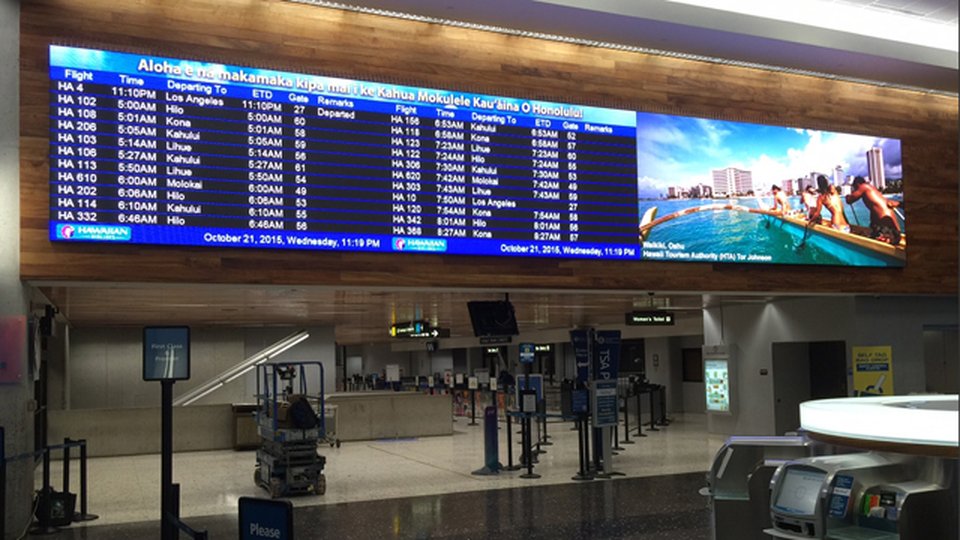
Design for moving passengers and changing information
Passengers scan displays while moving through busy public spaces. Set message hierarchy and text size around the viewing distance, direction of travel, dwell time and competing signs; confirm layouts with representative flight and wayfinding content before deployment.
Map airport displays to the passenger journey
Build a zone schedule before choosing screen sizes
Compare proposals against the complete tender scope
Plan screens around passenger decisions
A curbside sign, check-in display, security-area wayfinding screen and gate board do different jobs. Map each point where passengers need to identify a destination, confirm a status or respond to a change; use that journey map to set screen placement, message priority and the content owner.
01
Locate each decision point and record approach direction, viewing distance and dwell time.
02
Separate flight and service information from wayfinding and commercial content.
03
Agree language, legibility and accessibility needs with airport stakeholders.
Connect flight information, control and display responsibilities
LED hardware does not create or verify flight data. Confirm whether flight information is supplied by FIDS, a signage platform or another airport-approved system; define the interface, content ownership, update cadence, permissions and escalation path for incorrect or delayed information.
Primary check
Identify the authoritative source for each content type and who owns its accuracy.
System checks
Agree interface and network boundaries, publishing permissions, audit needs and fallback content.
Engineer for long operating hours and safe service
Airport screens often run for extended hours in public areas where access can be restricted. Coordinate structural loading, power, network, thermal conditions, cleaning, service access and maintenance windows with facilities and airport operations before fixing the display design.
Keep display locations clear of passenger circulation, security sightlines and required egress.
Plan safe access and a repair method that limits disruption to terminal operations.
Define monitoring, spare-parts coverage, escalation, maintenance windows and handover.
Engineering decisions that shape the system
The correct configuration depends on actual content, viewing positions and site conditions. Validate these project inputs with the airport and integrator rather than selecting a display by pitch or brightness in isolation.
Viewing distance & pixel pitch
Use the closest and farthest viewing positions plus sample flight tables, maps and text to assess resolution. Review a representative layout at realistic scale before confirming pixel pitch or screen dimensions.
Brightness & visual comfort
Measure or assess ambient light by zone and viewing direction, including glass façades and night operation. Specify a controllable range that supports readability while avoiding unnecessary glare for passengers.
FIDS & software integration
Document data formats, interface ownership, update behavior, content templates, network rules and the party responsible for each software layer. Confirm what the LED processor controls and what stays with airport systems.
Mounting, access & lifecycle
Review structure, cable routes, power, cleaning and maintenance access. Confirm who approves the installation, how components are reached safely and how service events are coordinated with terminal operations.
Airport LED display procurement checklist
A useful tender package makes proposals comparable and exposes integration gaps early. Include drawings and real content examples, then request clear scope boundaries and acceptance criteria for the full installed system.
01
Provide floor plans, screen elevations, sightline photos and passenger-flow context.
02
List FIDS/signage sources, network constraints, user roles and content examples.
03
Specify commissioning tests, staff training, service response and handover deliverables.
Airport LED display FAQs
Can one platform control every airport display?
A shared platform may be possible, but flight operations, wayfinding and advertising can have different data owners, publishing permissions and service needs. Confirm interfaces and responsibility boundaries before procurement.
What should be tested before opening?
Test representative flight and gate data, multilingual content, image and text legibility, feed delay and recovery, permissions, alarms, power restoration, brightness control and safe access for maintenance.
How do I choose pixel pitch for an airport LED screen?
Start with the closest and farthest viewing points and the smallest information passengers must read. Evaluate actual flight tables, maps and text in a sample layout; final pitch depends on the full sightline and content assessment.
Can an LED display connect to an airport FIDS?
It can be designed to present approved flight information through an agreed FIDS or signage interface. Confirm the data source, integration method, update responsibility, permissions and fallback behavior with the airport system owner.
What should be included in airport display acceptance testing?
Agree tests for actual content, data updates and failure recovery, viewing conditions, control permissions, brightness settings, power and network recovery, operator training and maintenance access before installation begins.
Plan an airport LED display project
Share the terminal zones, viewing distances, information sources, operating hours and integration constraints. Highcolor can help define the display, control and delivery scope for your project.
Contact Highcolor