
ENTERTAINMENT & EVENTS
DJ Bar LED Display
Plan a club LED display around sightlines, low-light viewing, live content and the way DJs and lighting teams run a show.
DJ bar LED displays: design for the room, not just the wall
Set a clear role for each screen zone
Match geometry and viewing distance
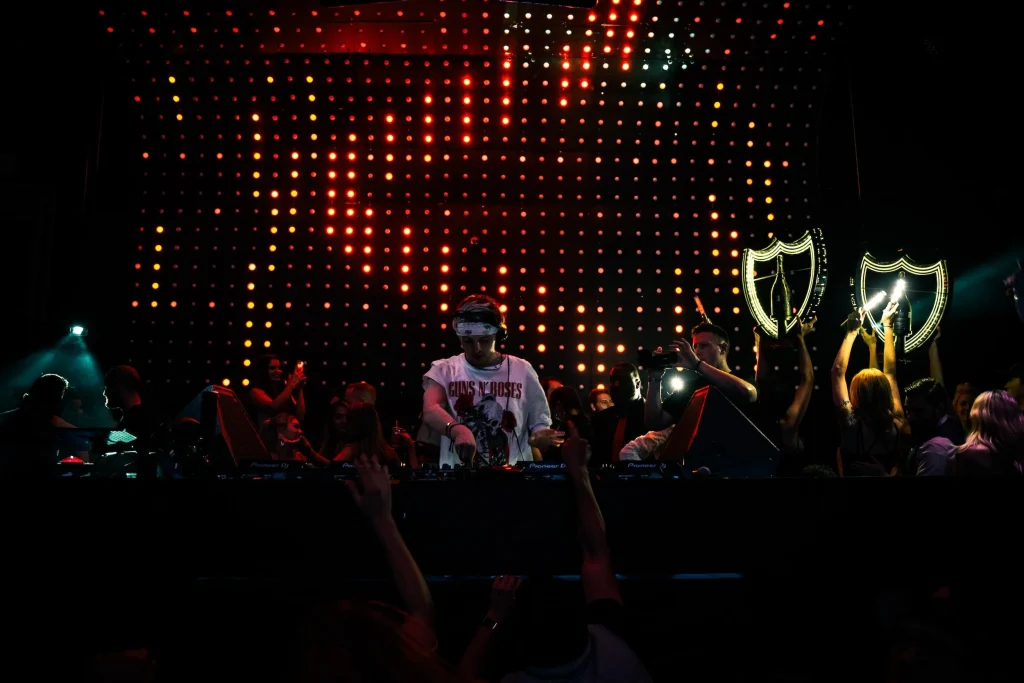
Make the display work with the venue's lighting rhythm
A successful club display connects the creative workflow to everyday operation. Confirm how content reaches the screen, how operators adjust brightness and presets, and how the team restores a reliable image if a show input fails.
Shape screen zones around audience and content
A DJ booth fascia, main wall and bar-facing display serve different viewing positions and jobs. Define the audience, content owner and operating schedule for each zone before selecting dimensions, pixel pitch and control method.
Plan a clear signal and show-control workflow
List DJ/VJ servers, playback, cameras and lighting cues; map each source to processor inputs and screen zones. Test switching, scaling and fallback content, then document brightness presets and a simple recovery procedure for venue staff.
Account for installation and venue conditions
Survey low ceilings, delivery access, mounting structure, power, ventilation, haze residue and vibration. Agree cable routes and front or rear service access, keep maintenance panels clear, and schedule installation around venue operations.
Tune for close viewing and camera use
Test logos, text, dark scenes, fast motion and white flashes from normal guest positions. Set stable low-brightness presets for a dark room, and check camera capture, reflections and sightlines if the venue streams or records performances.
Prepare a clear brief for your DJ bar LED display project
Share a venue plan, wall dimensions, closest viewing distance, screen zones, content sources, installation window and opening date. Include power, mounting and service constraints so a proposal can address the complete project.
Discuss your projectCommon DJ bar LED display configurations
Choose each zone by its audience, viewing distance, content role and access needs. A venue may combine several formats, but they should not compete for the same job.
Main DJ wall
A visual canvas behind or beside the booth. Plan audience sightlines, camera interaction, panel alignment and service access.
Booth fascia
A close-view feature integrated into the DJ booth. Consider comfortable brightness, impact protection, cable access and visibility from the dance floor.
Bar and event display
A separate zone for menus, schedules or sponsor messages. Use readable layouts and independent content scheduling.
Architectural feature
For corners, columns or ceiling accents, resolve structure, pixel mapping, seams and maintenance route before choosing content dimensions.
Prepare a clear DJ bar LED display project brief
A useful enquiry includes the venue context and operating requirements alongside screen dimensions. Include:
Venue and screen
Venue plan, wall dimensions, ceiling height, audience positions, nearest viewing distance, preferred display zones and camera use.
System and content
Media server and playback sources, lighting cues, content formats, brightness requirements, operator presets and fallback plan.
Installation and support
Mounting constraints, delivery access, power, ventilation, installation window, commissioning, staff training and service access.
Schedule and budget
Opening date, working hours, budget range, phasing plans and expectations for warranty and ongoing support.
DJ bar LED display: frequently asked questions
Answers to common planning questions for venue owners, production teams and integrators.
What pixel pitch should a DJ bar LED display use?
There is no single pitch for every club. Start with the closest normal viewing position, screen dimensions and content. Review representative text, logos and motion at actual viewing distance before finalizing the specification.
Can the display follow DJ or lighting cues?
It can be integrated with a media server, playback system or cue workflow when devices and signal paths are planned together. Define who triggers changes, test switching and latency, and retain a simple manual fallback.
How do we keep visuals comfortable in a dark venue?
Specify stable dimming and operator presets, then test them in the room at typical lighting levels. Review white flashes, saturated content and dark scenes, and document an upper brightness limit for the venue.
What should be checked before installation?
Confirm structural support, delivery access, power, ventilation, cable routes, service access and the installation window. Agree signal sources, commissioning tests, staff training and ongoing support ownership.
