
ENTERTAINMENT & EVENTS
Cinema LED Screen
Plan cinema LED displays around the viewing purpose, seating geometry, image pipeline and room design. Separate auditorium presentation from lobby signage before selecting a screen or comparing proposals.
Discuss your cinema project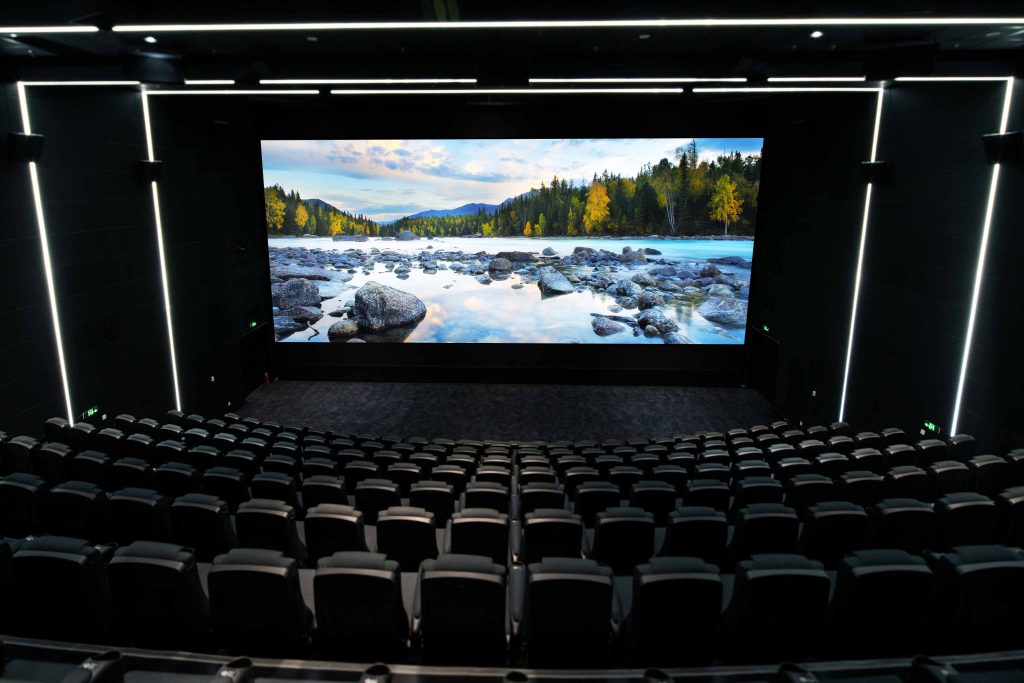
First decide what the screen must do
A cinema complex may need theatrical presentation in an auditorium, promotional content in the lobby, menu and wayfinding screens at concessions, or a feature display in a premium lounge. These jobs differ in image format, operating workflow, viewing distance and system requirements.
Treat the auditorium display as part of a cinema playback and room-design system. Treat public-area displays as digital signage unless the project brief states otherwise.
One venue, several display requirements
Separate each use case in the project brief so the supplier can recommend the correct display, content format and supporting equipment.
Auditorium presentation
For theatrical or scheduled film presentation, coordinate screen aspect ratios, seating sightlines, content playback, image calibration, sound integration and service access. Confirm the intended D-Cinema workflow with the cinema integrator.
Lobby and ticketing areas
Use signage for trailers, schedules, wayfinding, admissions or event announcements. Plan around brighter ambient light, changing content, close viewing and the venue’s publishing workflow.
Concessions and lounge
Menus, promotions and event content may require multiple small displays or a single feature wall. Confirm legibility from queues and seating, glare, sound expectations and who updates content.
Design the auditorium image around the room
A nominal screen size does not establish whether the image will suit the room. Begin with drawings and seating positions, then test geometry, image detail, architecture and maintenance requirements together.
Screen geometry and seats
Map screen width and height to the auditorium, seating rake, closest and farthest seats, sightline obstructions and intended aspect ratios. Review the edges of the image from representative seats.
Pixel grid and image detail
Select native resolution and pixel pitch against the intended image size and closest viewing position. Ask for an actual-resolution demonstration with dark scenes, gradients, fine detail and subtitles.
Image performance
Evaluate uniformity, grayscale, color consistency, black appearance, reflections and behavior across the intended brightness range. Request calibrated test content and an acceptance process agreed with the venue.
Sound, structure and cooling
Coordinate the display support, equipment location, ventilation, access and acoustic design with the room team. Check whether speakers sit behind or beside the display and how the final installation affects the sound path.
Verify the cinema workflow and device status
An indoor LED specification alone does not establish that an auditorium system is suited to D-Cinema exhibition. If that is the intended use, ask the cinema integrator to identify the proposed display and playback components, explain the secure content path and confirm the status of the exact make and model.
DCI publishes specifications, a Direct View Display addendum and a compliant-equipment registry. Check the specific device listing and test information with the supplier; do not infer system compliance from generic brightness, resolution or pixel-pitch claims.
Check the DCI compliant equipment registry →For lobby, concession and promotional signage, define the separate signage player or content-management workflow, required inputs, network ownership and content approval process.
Plan the playback and control chain before installation
A clear diagram shows where content enters, how it is processed and who operates each display. Request a signal-flow drawing and test the exact content path before the venue signs off on equipment.
Sources and formats
List cinema playback, media servers, promotional players, live events and any other intended sources. Record image formats, refresh expectations and whether each source feeds one screen or several zones.
Processing and changeover
Document processor configuration, aspect-ratio handling, presets, source switching and fallback behavior. Rehearse transitions between scheduled content and live programming with the operators who will run them.
Monitoring and handover
Define fault alerts, escalation contacts, calibration records, configuration backups and staff training. Keep final screen maps and recovery procedures accessible to the team responsible for the venue.
Compare full project scope, not only the display price
The total depends on the display configuration and the work required to integrate it with the auditorium or public areas. Request itemized pricing and compare the same assumptions across suppliers.
Display configuration
Screen dimensions, pitch, resolution, format, cabinet design, image performance targets and any unusual shapes or architectural integration.
Room and structure
Structural support, mounting, acoustics, ventilation, equipment-room changes, electrical work, cable routes and installation access.
Playback and control
Cinema playback components where required, processors, signage players, content systems, signal distribution, monitoring and licensing.
Commissioning and support
Installation, calibration, testing, training, spares, service response, maintenance access and the length and scope of warranties.
Include these items in the cinema RFQ
Drawings and viewing
Auditorium and public-area plans, seating layout, target dimensions, nearest and farthest viewers, sightline concerns and lighting conditions.
Content and system scope
Intended exhibition use, content formats, source list, aspect ratios, audio design, signage zones, control responsibilities and any required device-status documentation.
Delivery and acceptance
Project timeline, access and work windows, installation constraints, test content, image acceptance criteria, commissioning responsibilities, training and ongoing service expectations.
Frequently asked questions
What is the difference between a cinema LED screen and a lobby LED display?
An auditorium screen may be part of a theatrical content and playback chain, with specific image, security and operating expectations. A lobby display is generally a signage use case for schedules, promotions or wayfinding. Specify these separately.
Can any indoor LED screen be used in a cinema auditorium?
No generic indoor specification confirms suitability for a particular D-Cinema workflow. Confirm the exact system configuration, device status and integration requirements with the cinema supplier and integrator.
How do I choose pixel pitch for an auditorium?
Use the intended image dimensions, native pixel grid, closest seating distance and image detail requirements. Evaluate representative content from several seats before locking the specification.
What should a cinema LED quotation include?
Ask for the display, structure, playback and processing components, signal distribution, installation, testing, calibration, training, service access, spares and support scope. Require suppliers to list exclusions and assumptions.
What should be tested before acceptance?
Agree on image tests, content formats, source switching, audio coordination, operator workflows, fault response and documentation. Include viewing checks from representative seating positions.
Plan the cinema system around your auditorium
Share room drawings, seating locations, intended exhibition use, screen dimensions, content sources and the project timeline. We can help frame the display and integration questions for a project-specific review.
Discuss your cinema project